


Still plugged in after you are done?
A finished charging session can leave one more cable connection to deal with when your attention has moved elsewhere.
💝 Welcome to Tervizo!
🚚Free Shipping Over $49.99
✅ 30-Day Free Returns
💝 Welcome to Tervizo!
🚚Free Shipping Over $49.99
✅ 30-Day Free Returns
💝 Welcome to Tervizo!
🚚Free Shipping Over $49.99
✅ 30-Day Free Returns
💝 Welcome to Tervizo!
🚚Free Shipping Over $49.99
✅ 30-Day Free Returns
💝 Welcome to Tervizo!
🚚Free Shipping Over $49.99
✅ 30-Day Free Returns
💝 Welcome to Tervizo!
🚚Free Shipping Over $49.99
✅ 30-Day Free Returns
💝 Welcome to Tervizo!
🚚Free Shipping Over $49.99
✅ 30-Day Free Returns
💝 Welcome to Tervizo!
🚚Free Shipping Over $49.99
✅ 30-Day Free Returns
💝 Welcome to Tervizo!
🚚Free Shipping Over $49.99
✅ 30-Day Free Returns
💝 Welcome to Tervizo!
🚚Free Shipping Over $49.99
✅ 30-Day Free Returns
💝 Welcome to Tervizo!
🚚Free Shipping Over $49.99
✅ 30-Day Free Returns
💝 Welcome to Tervizo!
🚚Free Shipping Over $49.99
✅ 30-Day Free Returns


Couldn't load pickup availability
-
Ordered
- - -
Order Ready
- - -
Delivered

⚡ The Charger That Knows When to Stop Charging
Most people damage their batteries without even realizing it.
Leaving your phone plugged in overnight or charging for too long gradually reduces battery health. shortens lifespan. and leads to costly replacements.
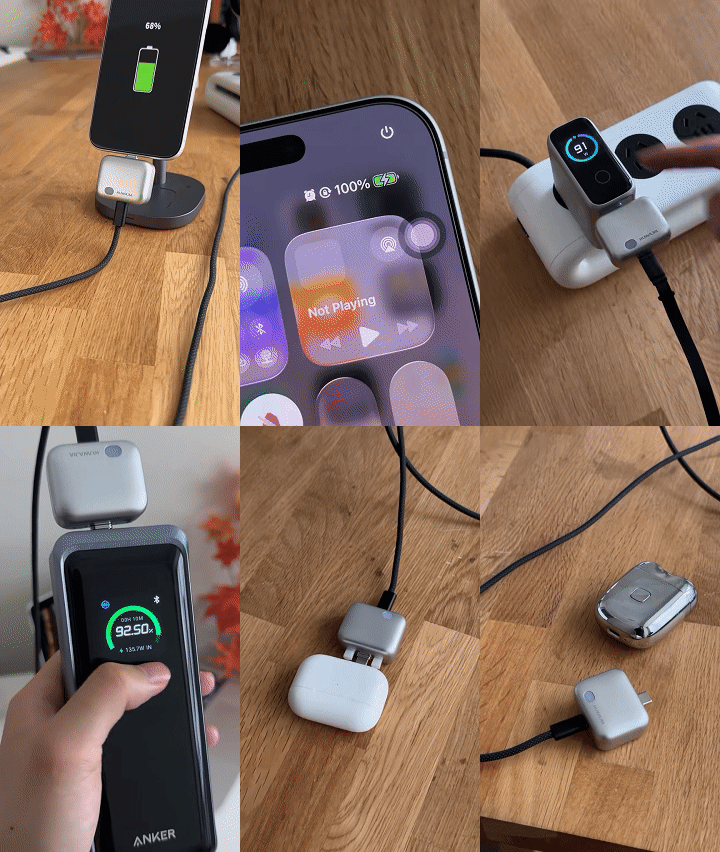
The 140W Type-C Battery Guard automatically disconnects power once charging is complete. helping protect your battery while delivering ultra-fast charging performance.
Simply plug it in and let smart charging take care of the rest.


You remember to start charging. Remembering to disconnect is another task. Add a physical auto-eject step to a compatible USB-C setup, designed to release the connection when its configured charging condition is detected.

For the small charging tasks that keep pulling your attention back.
A finished charging session can leave one more cable connection to deal with when your attention has moved elsewhere.
If you prefer a physically disconnected device, looking at the battery screen is another step in your routine.
Between work, study and everyday plans, manually ending every charging connection is easy to overlook.

The physical release is the product's defining feature. Allow space around the adapter so the mechanism can operate without pulling against the cable or device case.
Thick or recessed phone cases may prevent correct seating or interfere with the ejector pins.
Charging strategies and active device use can affect whether and when the adapter disconnects.
You plug in your phone, turn out the lights and forget the cable. If the device is left on bedding, covered by fabric or connected to damaged equipment, that unattended setup can become a fire hazard.
A physical disconnect is one charging function. Safe equipment, a clear charging surface and following the device instructions still matter throughout the charge.
Charging on bedding has been involved in documented home fires. Treat the charging environment as part of your routine.
The adapter does not generate power or turn a lower-power charger into a 140W charger. Actual charging power is limited by the compatible device, power adapter, cable and charging protocol.
*Up to 140W is the listing's adapter rating, not a guaranteed output for every setup. Confirm the actual supplied model's rating. A 100W cable limits the setup to its own supported rating.
| Product type | Inline USB-C auto-eject accessory |
|---|---|
| Power source | Compatible external charger required |
| Connection | USB-C charging setup |
| Colour options | Silver, Orange, Pink, Purple |
| Package | Check selected option for included items |
Choose the finish that suits your setup using the product options above.

Read the manual and confirm the adapter's ratings, supported device and case clearance. Use suitable charging equipment.
Connect the cable and device in the sequence specified by the manual. Choose the operating mode instructed for your device.
Verify charging and release behaviour while attended. Keep the mechanism clear and stop use if the connector, cable or adapter is damaged.
Choose your colour and check compatibility before adding it to your USB-C setup.